One desktop workflow for grouping, reviewing, naming, searching, and acting on images.
 ClusterLens
Desktop image clustering, face review, and metadata control
Open Repo
ClusterLens
Desktop image clustering, face review, and metadata control
Open Repo
Privacy-first desktop workspace
Make sense of giant photo folders without shipping your library to the cloud.
ClusterLens groups similar images, reviews faces, manages saved identities, mirrors EXIF only when you ask, and gives you a local workflow for turning chaotic folders into something reviewable. This page now uses a generated demo set with repeated identities and repeated scene groups so the clustering story is visible at a glance.
- No account, no forced sync, no browser dashboard, no Docker requirement.
- Clustering, face review, identity search, metadata tooling, and explicit file operations in one app.
- Generated demo data: 12 portrait images across 3 identities and 12 scene images across 3 visual groups.
Current reality: the full workspace is available from source today. The sample visuals on this page
come from a locally generated demo set that is small, private, and repeatable for testing both face clustering and
image clustering before you point ClusterLens at a real library.



Scan folders, cluster unknown faces, review pending labels, and maintain saved identities locally.
Persistent embedding, thumbnail, ANN, and result caches speed up repeated runs on real folders.
Source photos stay put unless you run file operations or choose EXIF mirroring yourself.
Generated demo data
A repeatable sample set for both clustering paths.
The landing page is now driven by generated local data instead of generic filler. The sample set contains three repeated face identities and three repeated scene groups, which makes the product story concrete before you open the app.
Maya, Daniel, and Serena each appear in four variants for face detection, face indexing, and identity clustering.
Beach, forest, and city groups repeat across four variants each for regular image clustering and gallery review.
Each portrait sample hits one face in a local OpenCV precheck. Each scene sample hits zero faces in the scene-only set.
Maya cluster
One identity repeated across multiple crops and framing changes to exercise face grouping.
Daniel cluster
A second identity to separate named clusters cleanly instead of collapsing every face together.

Serena cluster
A third identity with different hair, clothing, and lighting to make the grouping visible and testable.

Beach group
Warm shoreline scenes that should stay close in visual clustering without being mistaken for portrait content.

Forest group
Green trail scenes with repeated structure for image grouping demos and fast gallery validation.
City group
Neon night scenes that create an obviously different cluster from the beach and forest sets.
These visuals were generated locally for private demo use, then organized into a small repeatable dataset for ClusterLens.
Feature set
Built for full-folder review, not just one narrow clustering pass.
ClusterLens is a multi-surface desktop workspace. The app is not only a clustering panel, and it is not only a Faces pane. The real value is the path from discovery to review to naming to metadata/file actions.
Clustering workspace for real review runs
Run image discovery, compare multiple cluster backends, inspect cluster meaning and basis panels, and review grouped images in the same workspace instead of bouncing between tools.
- Basic and advanced clustering views
- Cluster comparisons, preview, meaning, and basis surfaces
- Cached embeddings, repeated-run reuse, and gallery review
Faces workspace with Photos, Detected Faces, and Face Results
Review whole photos with face boxes, switch to detected-face tiles for cleanup, and move into face-result groups when you want clustering, naming, or search.
- Human, dog, and cat face modes
- Folder-scoped scanning, cleanup, rescan, and fallback detector review
- Detected-face tiles, face results, right-click naming, and bulk naming
Face Search, Pending Review, and Identities
Move from clustered faces into find-similar search, saved-name search, pending-label review, people queries, and durable identity maintenance without leaving the app.
- Find Similar, query-photo search, and Find Photos by Saved Name
- Pending label accept/reject flows and people-together queries
- Identity import/export, merge, pin prototype, disable, and purge
Metadata and file operations in the same flow
Inspect files, edit metadata, mirror EXIF when you choose to, manage tags, and run explicit copy/move/trash/delete operations from the same review workspace.
- Photo Inspector, Metadata, File Ops, and Open Folder surfaces
- EXIF name/comment mirroring, Tag Manager, and Suggest Tags
- Sidecar import/export plus path export and audit-friendly file ops
Visible runtime, model, and privacy controls
Runtime behavior is surfaced instead of hidden. You can see CPU/CUDA mode, model choices, cleanup paths, support data, and face-data controls without digging through undocumented state.
- CPU and CUDA-aware execution with managed model installs
- Cache cleanup, face-data purge, and disable recognition controls
- Local runtime roots and redacted support-bundle export
Performance and repeated-run ergonomics
Large folders stay reviewable because discovery, embedding, tile loading, and face publishing are designed around caching, lazy rendering, and background work.
- Lazy gallery thumbnails and deferred detected-face publishing
- Embedding, ANN, thumbnail, and result-cache reuse
- Visible jobs, status, folder scope, and review-first workflows
Supported surfaces
The landing page now lists the actual app capabilities that were missing before.
The missing story was not only screenshots. It was also the actual feature surface: supported clustering algorithms, model choices, face-search flows, and the metadata/runtime tools around them.
Algorithms
Supported clustering backends are explicit now.
cosine-kmeans
hdbscan
graph
Use cosine-kmeans for fixed-count grouping, hdbscan for density and outliers, and graph for tight similarity groups.
The full workspace still exposes faiss and sklearn where those compatibility paths are available.
Faces uses HDBSCAN by default for review, with advanced override controls for manual clustering backends.
Models
Similarity spaces and model choices are part of the product.
semantic
cosine
image-text ready
Fast Preview, MobileCLIP, DINO, DINOv2 Base, CLIP, OpenCLIP, SigLIP, and ResNet are all part of the current clustering story.
The workspace can compare semantic and cosine spaces, then explain cluster meaning and basis in advanced mode.
Legacy or experimental full-workspace paths still include ConvNeXt, pHash Embedding, VGG, ViT, FaceNet, and DINO Large.
Workflow coverage
The missing story was the rest of the workspace.
Whole-photo review, face-tile cleanup, clustering results, and folder-scoped rescans live together in the Faces workspace.
Find Similar, query-photo search, saved-name lookup, pending-label accept/reject, and export cluster results are all present.
Show photos with these people, any named people, unknown people, or a primary person, then merge, pin, export, or import identities.
Photo Inspector, Tag Manager, Suggest Tags, EXIF mirroring, sidecar import/export, and file operations are part of the same review loop.
Disable Face Recognition, Purge Face Data, clear caches, inspect runtime storage, and keep generated data visible and local.
The full main.py workspace is what this page markets first. The clustering-only production package remains documented as a narrower surface.
App tour
Six real app states now walk through the desktop workflow.
These captures come from the generated local demo dataset inside an isolated runtime. They now cover clustering, full-photo review, detected-face review, saved-identity search, named-people queries, and the saved identities workspace instead of stopping at three pages.
Core review surfaces
The main workspaces stay separate, so you can review the full image, face detections, or clustering output without flattening everything into one overloaded screen.
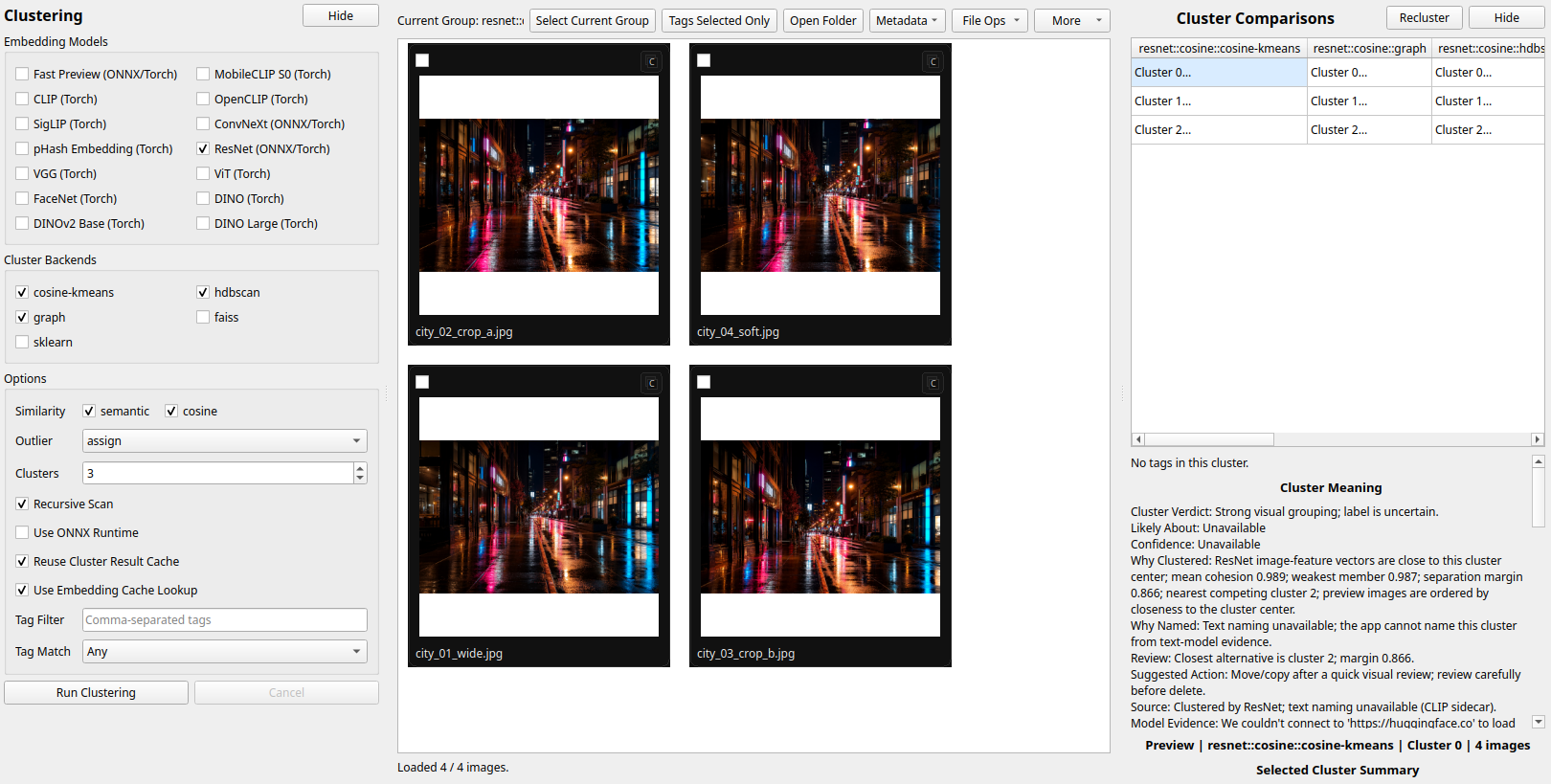
Clustering
Advanced controls, populated gallery review, cluster comparisons, and the production backends including Cosine KMeans, HDBSCAN, and Graph are visible in one page.
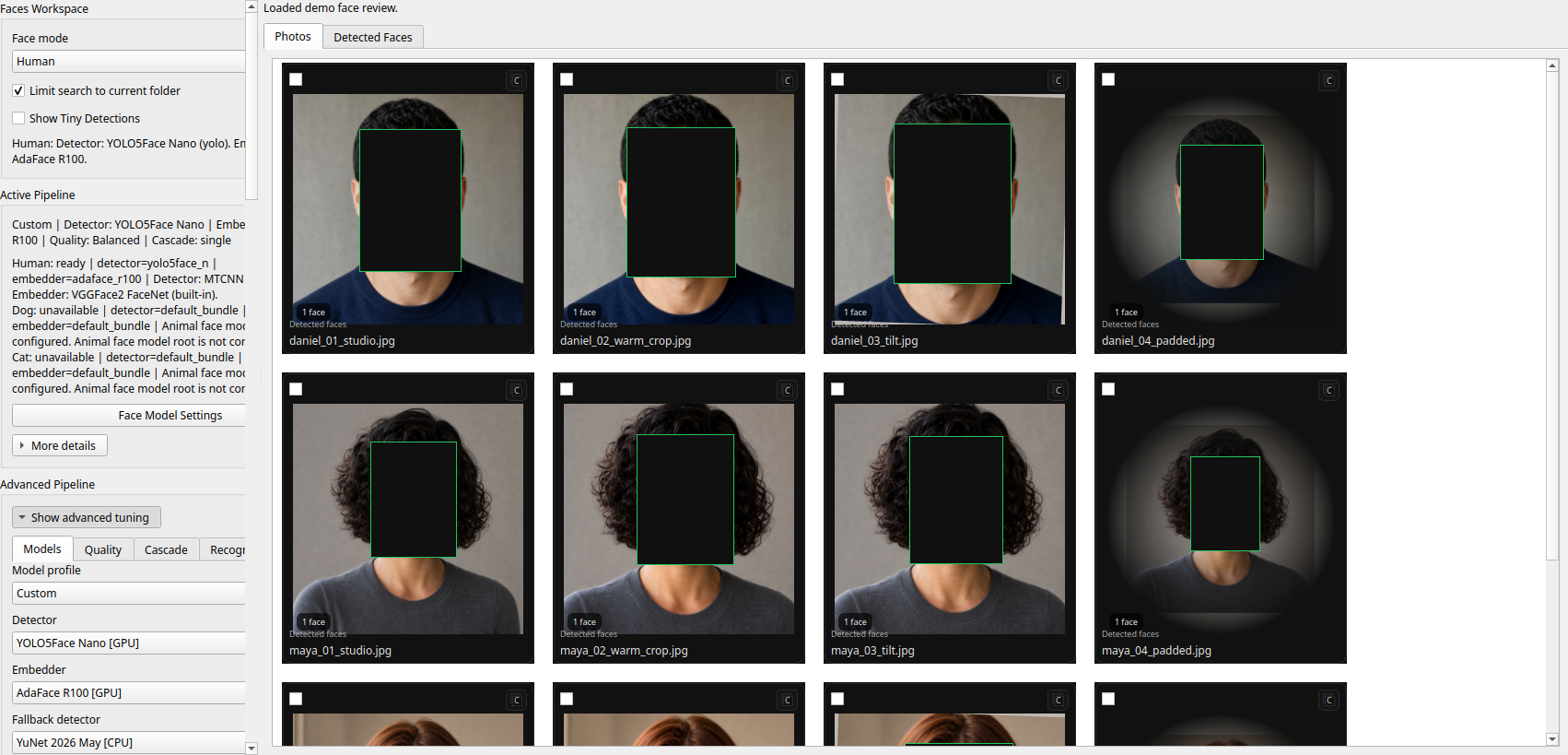
Photos
Whole-photo face review, visible detection overlays, folder-scoped browsing, and advanced pipeline settings stay together in the main Faces review surface.
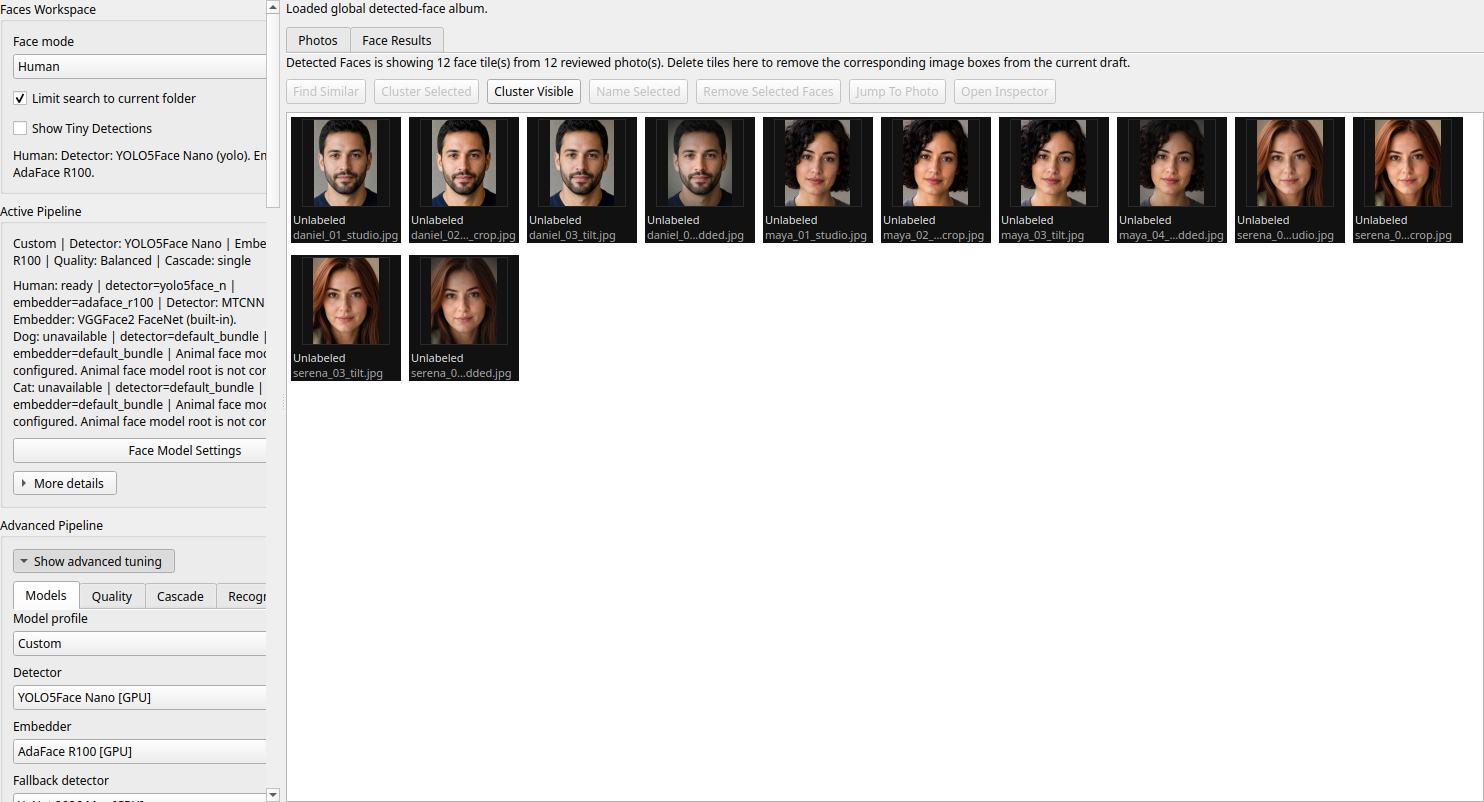
Detected Faces
Face tiles, Find Similar, Cluster Visible, naming, removal, jump-to-photo, and inspector actions are all visible once the folder review is populated.
Search and identity workflows
The Faces workspace also covers query-photo search, saved-name recall, named-people filtering, and identity maintenance without sending anything to a cloud service.
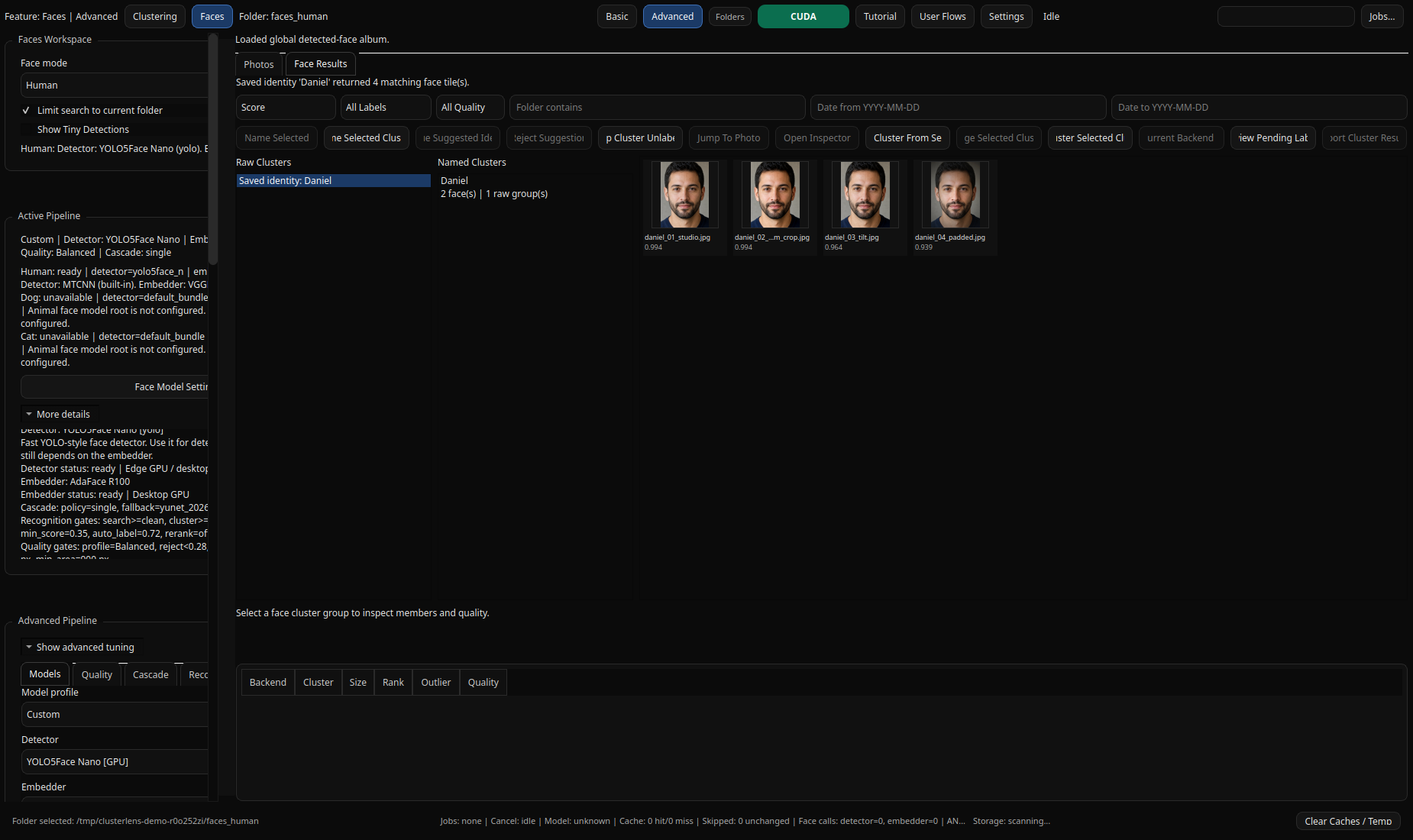
Saved Identity Search
Run a saved-name search, inspect raw versus named groups, filter by score and quality, and review the returned face tiles with visible similarity scores.
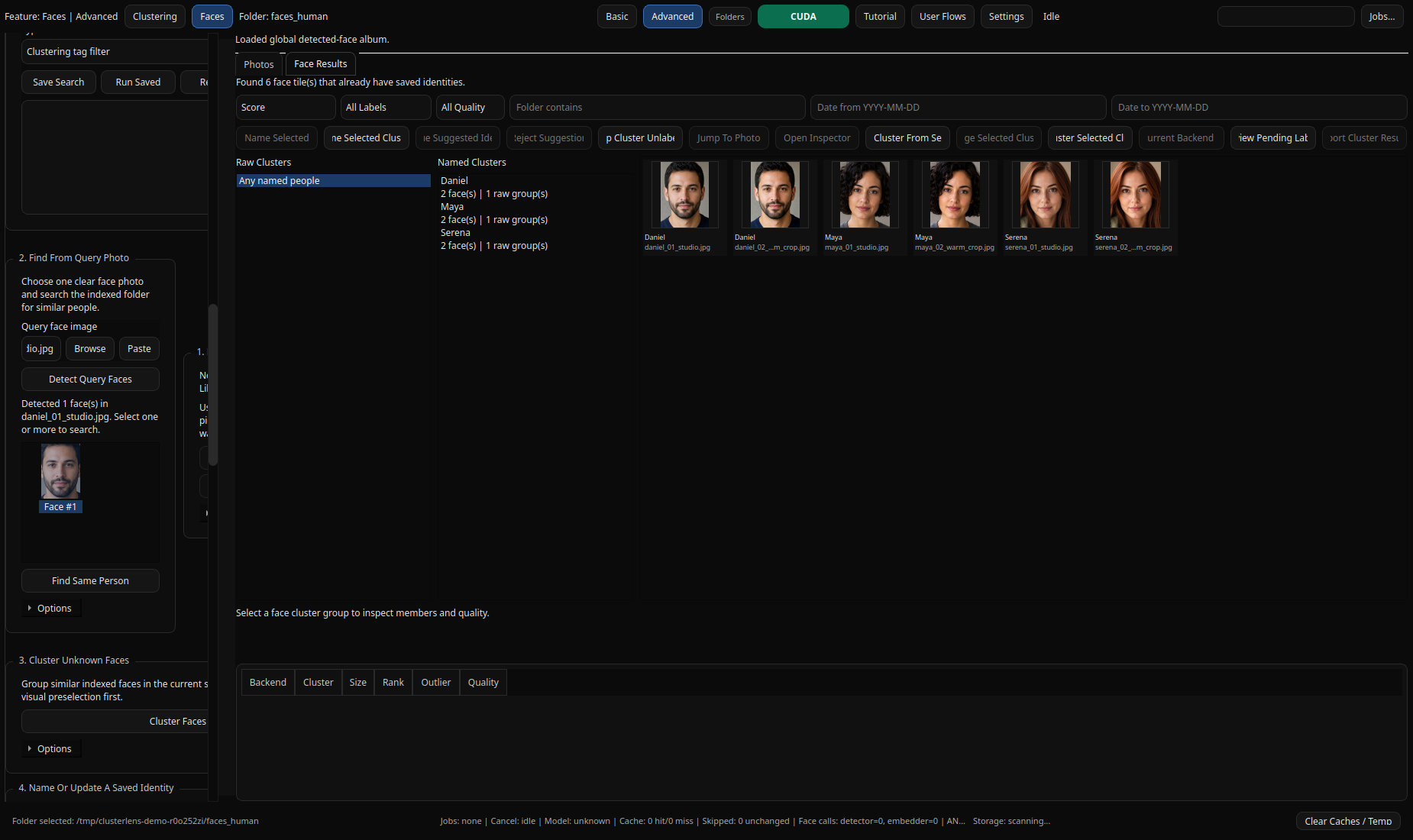
Query Photo + People
Query-photo search, named-people lookups, cluster actions, and saved-name review stay in the same workspace so you can move from one face to the whole folder quickly.
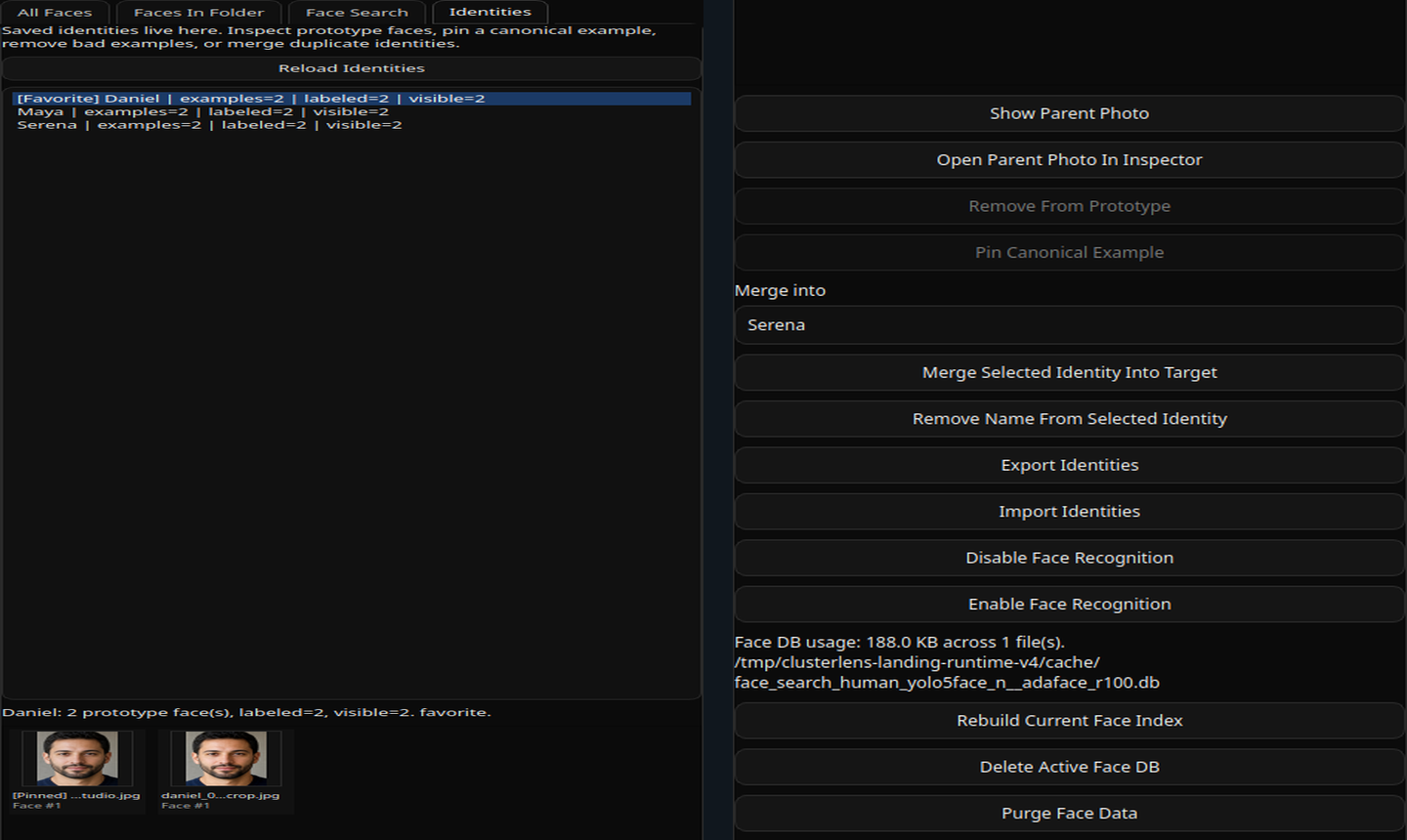
Identities
Saved identities include prototype curation, merge targets, export and import, recognition toggles, and explicit rebuild, delete, and purge controls for the active face database.
Privacy first
Your photos stay on your machine unless you explicitly tell ClusterLens otherwise.
The app is local-first by design. It does not require an account, does not need cloud sync, and does not silently move, delete, or rewrite source files. The runtime root, cache footprint, and cleanup paths are part of the product, not hidden implementation details.
Local runtime, local data
Clustering results, face indexes, saved identities, logs, support bundles, caches, and model assets live in your local runtime root.
No hidden writes
Source images are not modified unless you run a file operation or choose EXIF mirroring yourself.
Purge and cleanup controls
Face data can be disabled or purged, caches can be cleared, and rebuildable storage is separated from logs and model assets.
Offline-aware model behavior
Model downloads are visible and controllable. Offline mode can force the app to use only bundled or already cached assets.
Install story
Run it today. Make packaging simpler over time.
The full desktop workspace is available from source now. The packaging path is being shaped around real desktop installs, not containers: one-EXE style CPU builds, a separate GPU package, and future Flatpak-style distribution as release packaging closes out.
Today: run the full workspace from source
The full feature set lives in the legacy desktop shell launched by main.py.
Linux and macOS
python -m venv .venv
./.venv/bin/python -m pip install -e .
./.venv/bin/python main.py
Windows PowerShell
py -3.11 -m venv .venv
.\.venv\Scripts\python.exe -m pip install -e .
.\scripts\run_app.ps1
Packaging direction already exists in the repo
The repo includes Windows packaging scaffolding, a production manifest, PyInstaller build variants, and a Windows installer script.
- CPU public build path targets a one-file EXE.
- CUDA gets a separate larger package.
- Manifest targets Windows, Linux, and macOS release surfaces.
No containers. Real desktop installs.
The goal is a simpler desktop install story: one executable where it makes sense, a proper GPU package where needed, and future Flatpak-style distribution for Linux users without pretending that all of that is fully shipped today.
Full-workspace packaging is still catching up to the feature-rich source build.
Important split: the packaged production app currently focuses on clustering, gallery, inspector,
diagnostics, and runtime controls. The full
main.py workspace includes Faces, face search, pending-label
review, identities, and the broader metadata/review flow showcased on this page.
Documentation
Start with the docs that match how you work.
README
Project overview, repo layout, and entrypoints.
User Guide
Install, launch, runtime roots, privacy, cleanup, and troubleshooting.
User Flows
Exact workflows for clustering, Faces, metadata, identity review, and cleanup.
Production Split
What ships in the production package path versus the full legacy workspace.