Learning path instead of animation soup
The dense lab keeps a tabular learning path aligned to the active replay frame so learners can track what stage is done, what is current, and what comes next.
Neural Network Desktop Tutor is a standalone PyQt app for teaching neural networks through replay, targeted inspection, ablation, and family-specific labs. It is not a slide deck about backpropagation. It is a lab where learners can watch gradients move, click a node, and ask what changed and why.
Dense replay is fully live today. CNN, LSTM, Seq2Seq, and Transformer each have dedicated family labs.
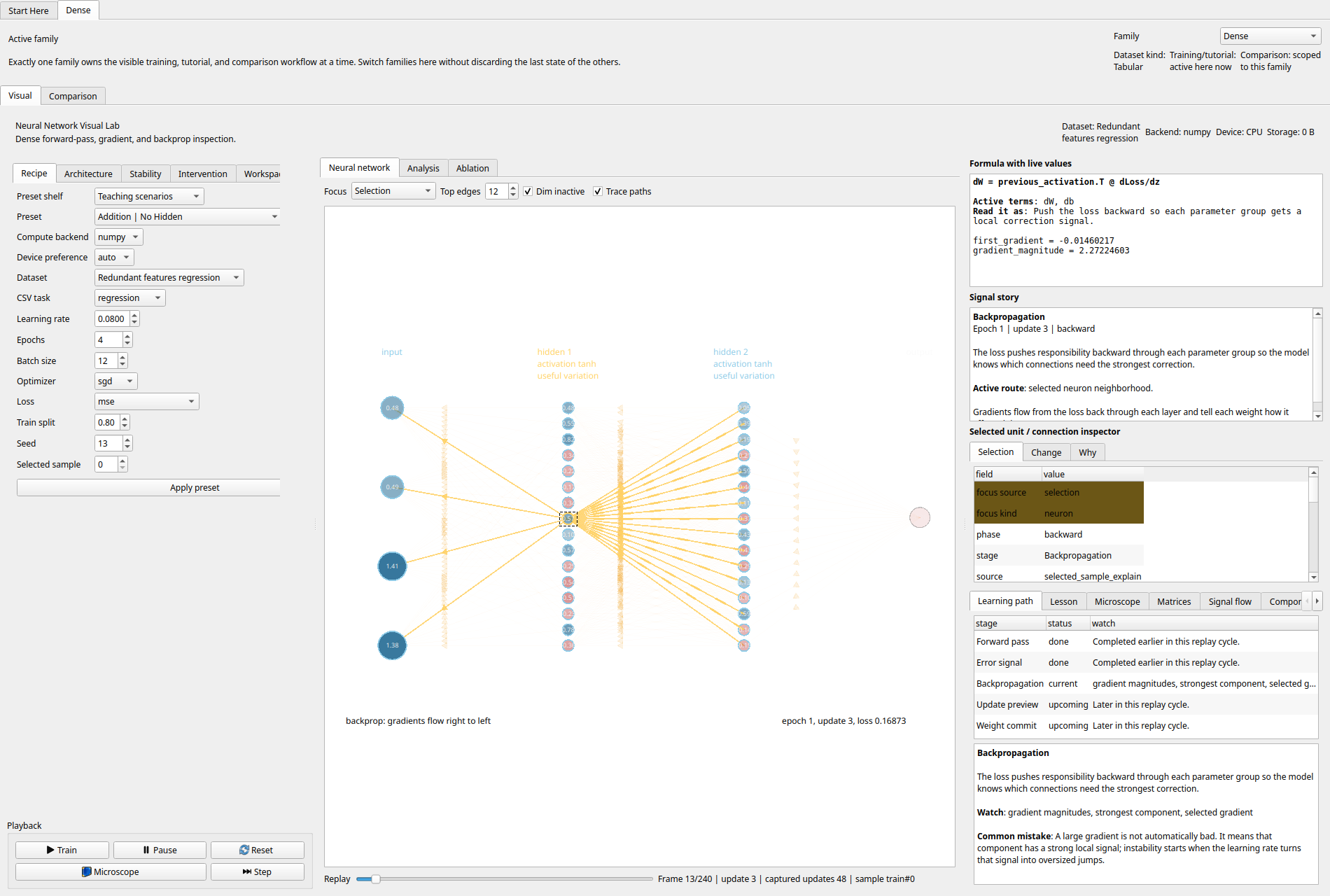
A replayable network scene, formula pane, causal inspector, learning path, and selected-neuron evidence all in one view.
Most neural-network teaching tools stop at intuition theater: arrows, gloss, and static diagrams. This one treats the learner like an engineer. It exposes the actual training sequence, the local evidence behind a parameter update, and the consequences of interventions on the same screen.
The dense lab keeps a tabular learning path aligned to the active replay frame so learners can track what stage is done, what is current, and what comes next.
Selection is first-class. Clicking an edge or neuron updates inspector tables with identity, deltas, gradients, contribution, and the strongest inbound or outbound drivers.
Microscope, teaching presets, stability controls, interventions, and comparisons let you tune the lesson without freezing the app into a fixed script.
The app keeps one active family at a time so the user is not juggling unrelated controls. Each family inherits a common visual shell and adds its own data type, inspection surface, and comparison language.
Tabular datasets, replay, challenge checkpoints, focus modes, interventions, and post-training ablation.
Tiny image datasets, learned replay, kernel selection, feature maps, and filter ablation.
Sequence datasets with hidden-state replay, timestep and unit ablation, and recurrent comparison presets.
Source-target tasks, learned alignment views, decoder-state inspection, and token ablations.
Standalone retrieval and alignment lab for head, token, and key-slot reasoning.
Prompt-output language-model tasks with learned replay, token/head/block ablation, and comparison presets.
These captures come from the current app state, including the manual verification matrix used to check dense-lab readability and interaction quality.
The microscope flow strips the network down so one selected weight can carry a full local story through the replay, inspector, and explanation panes.
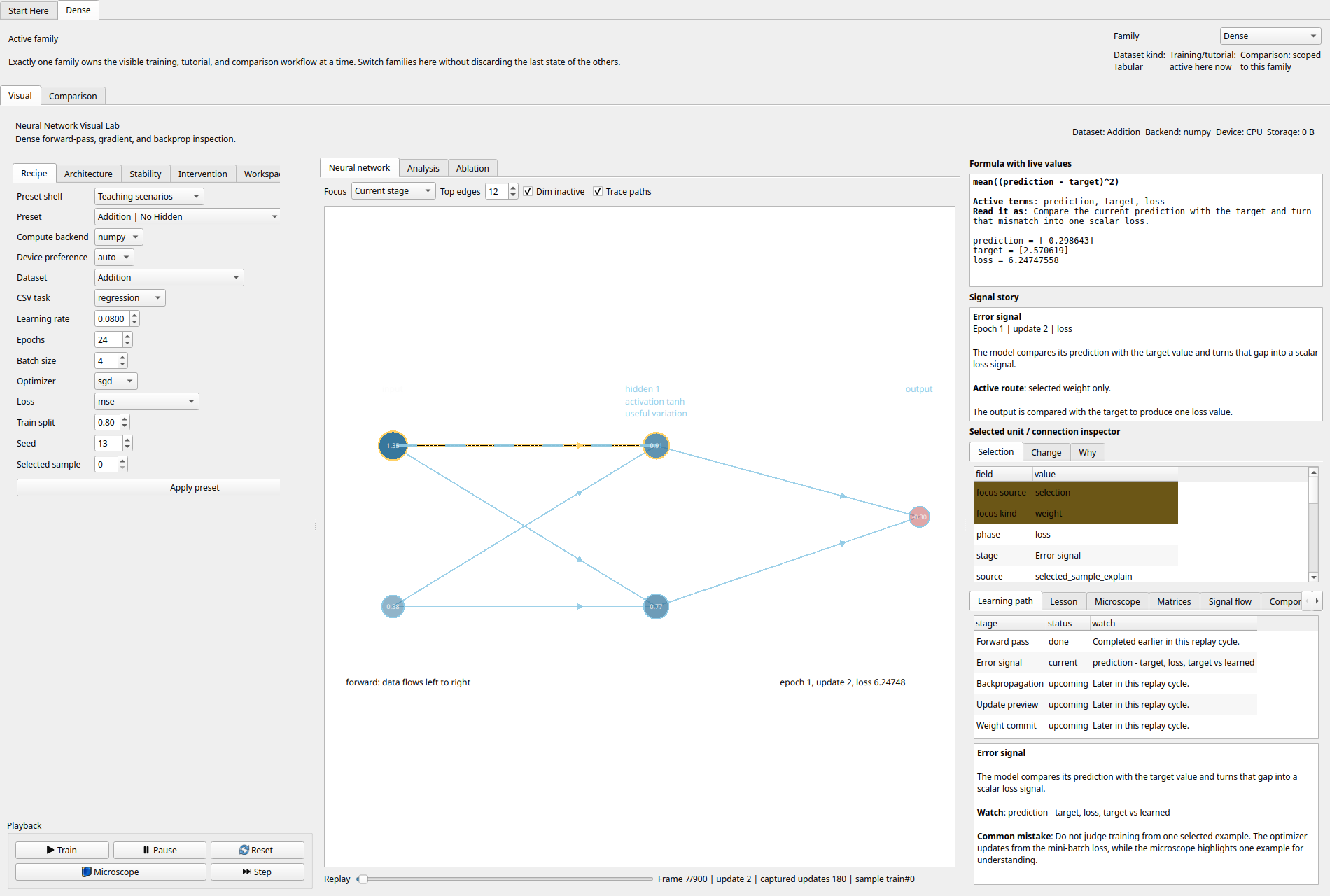
The product loop is simple: choose the family, load a scenario, train, scrub replay, click a part of the model, then verify hypotheses with ablation or comparison.
Use the start page, microscope preset, or a teaching scenario to constrain the problem before training.
Replay automatically advances through the learning path instead of hiding the training sequence behind a final metric.
Selection pins one weight, neuron, or layer into the right-hand inspector so the lesson becomes local and testable.
Use ablations, comparisons, or scenario shifts to check whether the story still holds once the model is perturbed.
This is a desktop-first project. No cloud account, no browser dependency, and no remote dataset required to start exploring the labs.
Install the base app and launch the desktop tutor.
UV_CACHE_DIR=.uv-cache uv sync --extra dev
UV_CACHE_DIR=.uv-cache uv run neural-network-desktop-tutorIf you want the optional PyTorch path for supported trainers, add the `torch` extra first.
UV_CACHE_DIR=.uv-cache uv sync --extra dev --extra torchNeural Network Desktop Tutor is for classrooms, self-study, demos, and internal teaching sessions where “trust me, gradients flow backward” is not enough. The point is not just to show a network. The point is to let a learner inspect the reasons a network changed.