AI Assistant + Security Pipeline

Mail intelligence with evidence. Security with receipts.

Thunderbird answers from bounded mailbox context, not hand-wavy chat memory. It parses, verifies sender auth, scans attachments, redacts, ranks, cites, and only then sends the final Assistant request to a configured Ollama endpoint.

Endpoint-only Assistant Conversational AI routes through a configured Ollama endpoint, with Thunderbird still owning prompt assembly, retrieval, and history.
Local analysis first FLAN-T5 summaries, MiniLM embeddings, GLiNER PII, deterministic tags, template extraction, and security evidence stay bounded and inspectable inside the app before any endpoint answer is requested.
Nothing opaque Runtime queues, endpoint probes, traces, citations, generated files, and cleanup controls stay visible from Thunderbird’s own UI.

Six capabilities that make AI mail usable in the real world.

This is not a generic chatbot bolted onto a mailbox. The product is designed around grounded retrieval, visible processing stages, bounded context, and security evidence that users can inspect.

01 • Assistant

A conversational Assistant over real mail

Ask about selected messages, a folder, an account, or all analyzed mail. Thunderbird narrows scope, composes evidence, and keeps citations attached to the answer path instead of turning the inbox into a detached chatbot transcript.

02 • Retrieval

Bounded RAG instead of mailbox dumping

Retrieval ranking, compression, and context budgeting happen before inference, so the model sees the right slices of mail instead of a reckless full-folder paste.

03 • Security

RFC-aware auth plus attachment AV evidence

DKIM, SPF, DMARC, sender trust, URL findings, and bundled ClamAV attachment scan results can feed a bounded security view, helping users understand why a message looks safe, suspicious, or incomplete.

04 • Local Processing

Summaries, embeddings, PII, and native tagging

FLAN-T5 handles local summaries, MiniLM supports embeddings and RAG, GLiNER covers PII, and the native classifier keeps fast local categorization available even before Assistant synthesis.

05 • Runtime

Visible queues, probes, and traces

Users can inspect endpoint health, active work, backlogs, trace payloads, and runtime logs instead of treating AI as a black box.

06 • Governance

Cleanup and reset without guesswork

Generated files, traces, caches, and model artifacts stay visible from the product, with deletion and reset flows that do not require spelunking through hidden directories.
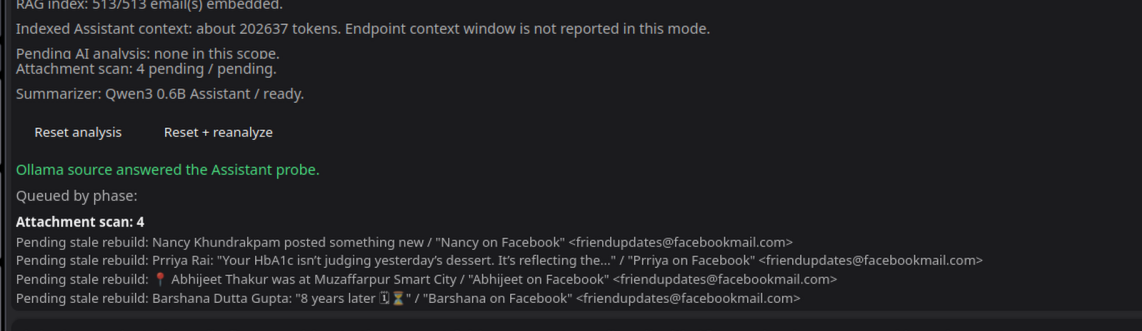
Actual product surfaces, not made-up marketing chrome.

The landing page now shows real captures from the app: the Assistant runtime view and the specialist local roles that back summaries, privacy, and retrieval.

Thunderbird Assistant runtime showing indexed mail, attachment scan backlog, and successful Ollama probe.

Assistant runtime and queue visibility

Scope, indexed RAG mail, attachment-scan backlog, and endpoint probe state are all visible from the Assistant surface instead of hidden behind background jobs.

FLAN-T5 Small Summarizer local role header.

Summarizer

FLAN-T5 stays visible as a dedicated local summary role.

GLiNER PII local role header.

PII guard

GLiNER keeps privacy detection bounded to a named role.

MiniLM Embedder local role header.

RAG embedder

MiniLM powers embeddings and retrieval-oriented indexing.

Security is not a footer note. It is part of the message pipeline.

Before any answer is synthesized, Thunderbird can already parse the message, inspect trust and sender signals, verify sender auth, evaluate URLs or attachments, redact PII when required, and attach bounded evidence to the final decision path.

What stays Thunderbird-owned

Parse → Inspect → Rank

Mailbox selection, parsing, security evidence, template extraction, retrieval planning, citations, redaction policy, and prompt assembly remain inside Thunderbird.

What leaves the app

Only final bounded synthesis

The configured Ollama endpoint receives the final bounded request, not the entire mailbox, not hidden product state, and not an unreviewed flood of raw content.

What users can audit

Logs, traces, evidence, cleanup

Runtime traces expose endpoint URL, model, retry state, and retrieval evidence. Data Governance keeps generated artifacts visible and removable.

RFC-aware sender authentication

DKIM verification, SPF header evidence, and DMARC policy plus alignment checks are part of the mail-native security story, including alignment against the RFC5322 From domain.

DKIM SPF DMARC RFC5322 From

Embedded AV for attachments

Bundled ClamAV attachment scanning runs as part of Thunderbird’s own security path, with asynchronous queueing so mail review does not block on a single large attachment.

ClamAV Attachment queue Background scan

PII-aware privacy gates

GLiNER and deterministic rules keep sensitive content reviewable, redactable, and visible as a separate mailbox role instead of burying privacy decisions inside a generic prompt.

GLiNER PII Local redaction Policy trace

Summaries, RAG, and a talk-to Assistant

FLAN-T5 summaries, MiniLM embeddings, and the Ollama-backed Assistant work as one layered flow: summarize locally, index for retrieval, then ask questions over bounded evidence.

FLAN-T5 MiniLM Ollama Assistant Bounded RAG

The Assistant workflow is explicit from first parse to final answer.

The model is the last stage, not the whole product. This keeps AI grounded, keeps security evidence available even during failure, and makes debugging practical when an endpoint or local stage degrades.

1

Select scope

Selected messages, folder, account, or all analyzed mail.

2

Parse mail

Canonical body, MIME structure, trust, and sender context.

3

Inspect security

DKIM, SPF, DMARC, AV, URL, and trust evidence is attached.

4

Extract signals

Templates, regex hits, categories, PII, summaries, and embeddings.

5

Retrieve + compress

Rank relevant messages and build a bounded evidence pack.

6

Synthesize

Send the final request to the configured Ollama endpoint.

Why this page matters

The product promise is simple: if AI touches your mail, you should be able to see what it saw, what it sent, what it stored, and how to remove it.
Operational home Settings > Assistant covers endpoint setup and testing. Runtime surfaces show queues, payloads, logs, and traces. Local Models and Data Governance expose artifact state and cleanup.
Failure without unrecoverable mystery Endpoint failures, missing embeddings, stale analysis, and security sidecar issues can be surfaced as visible state instead of silent collapse.
Designed for serious inboxes This architecture supports broad mailbox context, bounded context windows, security analysis, and evidence-rich answers without pretending the model alone is the product.


